
Every SharePoint migration that goes badly had a good tool. That is not an argument against tooling; it is the observation that starts this book. The tools available today copy files, versions, metadata and permissions reliably enough that the copying is rarely what fails. What fails is everything the tool was never asked about.
This chapter is the shortest in the guide and the only one with no evidence to gather. It exists to settle three things before the work starts: what you are actually doing, who decides, and who says it worked.
Three different projects wearing the same word
"Migration" gets used for three jobs that have different costs, different risks and different people. Naming which one you are doing is the first decision of the project, and getting it wrong is expensive in a way that shows up late.
| The job | What changes | What stays | Typical failure |
|---|---|---|---|
| Upgrade | the version | the platform, the shape of the content, the way people work | a blocked database, found on the night |
| Migration | the platform | the shape of the content, mostly | something that does not exist at the destination |
| Modernisation | the way people work | the content, sometimes | users who did not want it and were not asked |
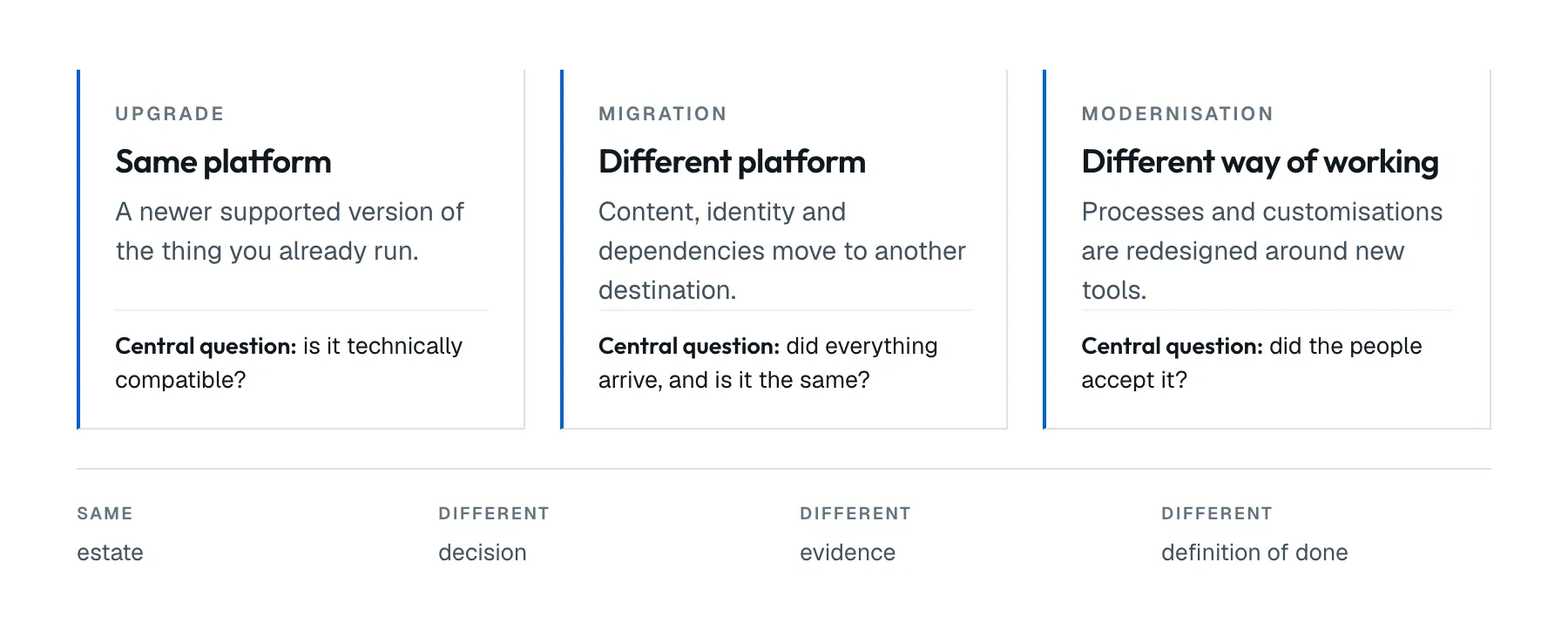
Figure 1.1. The same estate, three different definitions of done. They are drawn side by side rather than in a line because none of them requires the others.
An upgrade from SharePoint Server 2016 to Subscription Edition is a supported database-attach path with documented steps. A migration to SharePoint Online is a different platform where some of what you have does not exist. Modernisation is a change to how people work, and it is the only one of the three that can fail while every technical step succeeds.
Most real projects are two of these at once, and that is fine. What is not fine is a project that budgeted for an upgrade, scoped a migration, and quietly promised modernisation to the people who signed it off.
We recommend naming the project after the hardest of the three it contains. Call it "the 2019 upgrade" while it also moves half the estate to SharePoint Online, and everyone will judge it as an upgrade. It will look late from the first week.
What actually makes it hard
The copying is the part with a product behind it. Everything below is the part with your organisation behind it, and it is where the schedule goes:
- the customisations nobody owns. Not the count: the ones where the person who wrote them left, the person who uses them does not know it is custom, and nobody can say what it does;
- the content nobody has opened in four years. You will migrate it, validate it and pay for it, unless somebody decides otherwise;
- the integrations that fail quietly. A nightly job that writes into a list does not throw an error visible to anyone until the month-end report is wrong;
- the permissions that were never intended. Unique permissions piled up over a decade of "just give them access". The migration reproduces them faithfully, including the ones somebody should have removed years ago;
- the people who have to confirm it worked, who have day jobs, and whose availability is usually the real constraint on how fast waves can run.
None of these are tool features. All of them are decisions with names attached.
Who decides, and who validates
These are different people, and a project that lets them be the same person has no validation.
The decider owns the destination and the budget. They answer to the constraints in chapter 4: residency, policy, cost, skills. There is one of them. Two deciders reopen the destination halfway through, and they reopen it at the worst possible moment.
The validators own the content. They are the site owners, the process owners, the people who know that the form is meant to route to Finance on the second approval. There are many of them, and they say whether a wave is accepted. A migration lead cannot validate content: they can only confirm that the numbers match, which chapter 14 explains is not the same thing.
The third role is the one projects forget: who can say stop. Not who decides the destination, and not who accepts a wave, but who can halt the migration at two in the morning when the numbers do not match. Chapter 15 turns that into a go/no-go with written criteria; this chapter only insists that the person exists, that they are awake during the window, and that everyone in the room knows it is them. A migration where nobody has the authority to stop is a migration that continues past the point where it should not.
Write all three down before anything moves. A wave with no named validator passes on silence, and silence is where the failures you find six months later come from.
What it costs to name it wrong
The naming is not paperwork. It sets four things that are painful to change later:
| Named as | Budget assumes | Calendar assumes | Success means | People needed |
|---|---|---|---|---|
| Upgrade | infrastructure and a window | weeks | the farm is on the new version | administrators |
| Migration | remediation of what does not exist at the destination | months | the content works where it now lives | administrators, developers, site owners |
| Modernisation | rebuilding how work happens | quarters | people work differently, on purpose | all of the above, plus the business |
A project funded as the first row and scoped as the second runs out of budget at the exact moment the remediation starts, which is also the moment it is hardest to stop. A project that quietly promised the third row will be judged against it by the people who approved it, whatever the technical outcome.
We recommend writing the row you are in on the first page of the project document, in those words. It costs one sentence and it settles arguments for a year.
What this means for the order of work
The rest of this guide follows from the position that the tool comes last:
- know what you have (chapter 2);
- decide what deserves to survive (chapter 3);
- choose the destination and record why (chapter 4);
- price that choice, and price leaving things as they are (chapter 5);
- decide how the destination will be governed before you build it (chapter 6);
- understand the estate in depth, then what does not move as it is (parts II and III);
- choose the future and prepare for it (part IV);
- pilot, migrate, validate, cut over (part V);
- do not abandon the old world too early, then operate and decommission properly (part VI).
Pick the tool somewhere around step 7, when you know what it has to do. Picking it at step 1 means the tool's capabilities become the project's scope, which is how organisations end up migrating four years of unopened content: it was easier than deciding not to.
Out of scope
Comparing migration tools. They change faster than a book can, and the choice depends on the destination and on what you found in chapters 2 and 3. This guide names a tool only where the decision genuinely turns on it.
Why to modernise at all. The argument that an organisation should change how it works is made to a different audience, usually before a migration project exists, and this book starts after it was won. What this book does cover is what that decision costs once a destination has been recommended: chapter 5 builds the business case, and it prices the recommendation rather than reopening it.
Before you continue
- You can say which of the three jobs this project is, and which is the hardest one it contains
- The project is named after that one
- One person owns the destination decision, and they know it
- The validators are named, per area, and they know it
- One person can halt the migration, and everyone knows who
- Nobody has bought a migration tool yet
If you want a fast read on where your environment probably lands before going further, the SharePoint Compass takes about two minutes and gives you a rules-based recommendation with the reasons behind it. This chapter, and the next three, are the long version of that answer.
pH7x Systems. Chapter 1 of the SharePoint Migration Field Guide, published 2 August 2026 at ph7x.com/guide. The guide is being written one chapter at a time; the chapters that exist are listed there.
Download chapter 1 (PDF)Same text, same tables, same sources as this page.