
There is a lot of confusion between SharePoint 2016, SharePoint 2019, Subscription Edition and SharePoint Online, and most of it comes from comparisons built out of feature lists.
Feature lists are the wrong tool. The decision is made by three things: when support ends, what the licence actually entitles you to, and which of the differences touch your architecture. This article is those three things, checked against Microsoft's own documentation rather than against other articles.
Support, which is the only date that matters
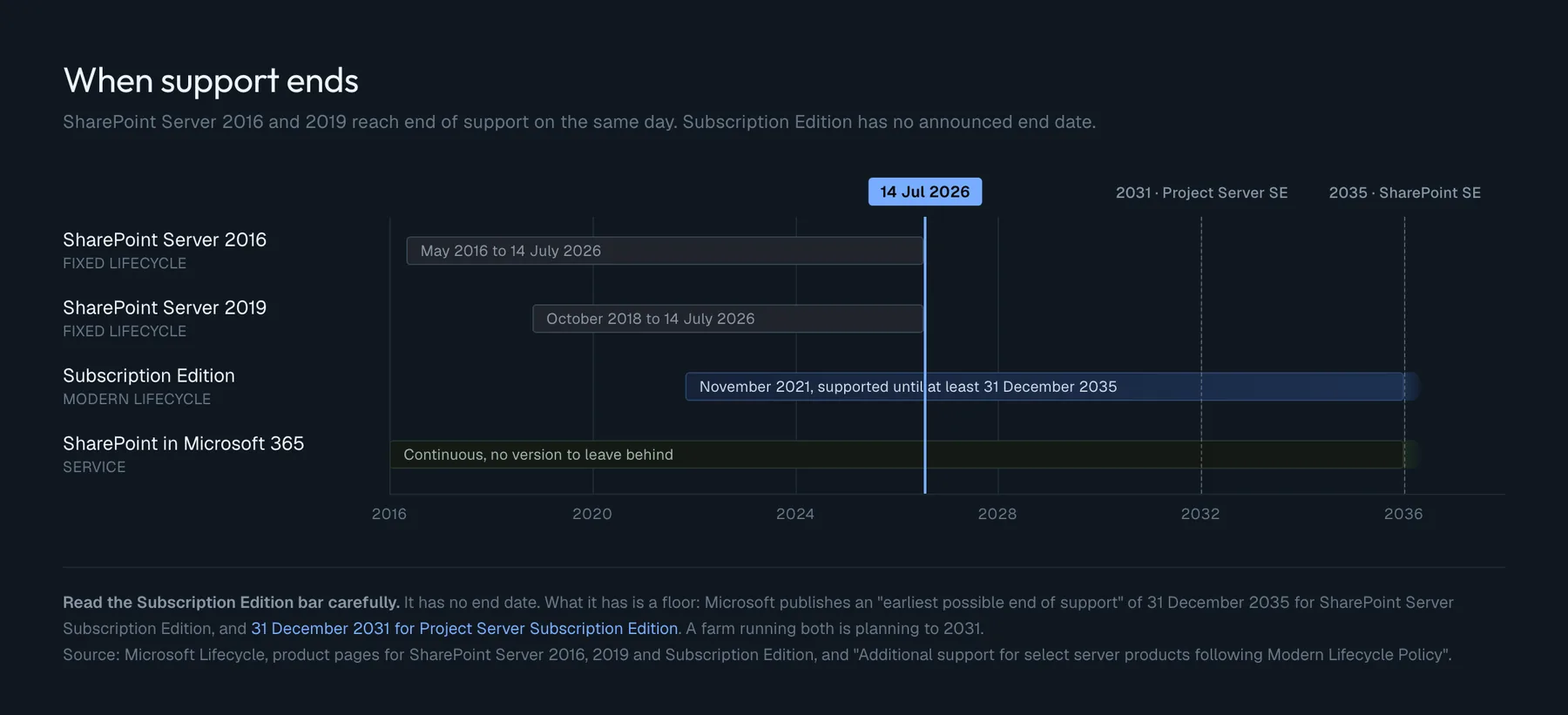
| Product | Lifecycle policy | Released | Mainstream ends | Support ends |
|---|---|---|---|---|
| SharePoint Server 2016 | Fixed | 1 May 2016 | 13 July 2021 | 14 July 2026 |
| SharePoint Server 2019 | Fixed | 22 October 2018 | 9 January 2024 | 14 July 2026 |
| SharePoint Server Subscription Edition | Modern | 2 November 2021 | not applicable | no date announced |
| SharePoint in Microsoft 365 | service | not applicable | not applicable | not applicable |
Two things in that table are worth stopping on.
2016 and 2019 end on the same day. That is not a rounding of two nearby dates. Microsoft aligned the 2019 extended support end date with the 2016 one deliberately, so that 2019 would not end support earlier than its predecessor. If you upgraded from 2016 to 2019 to buy time, the calendar shows how much you bought: none.
Subscription Edition has no end of support date, and that is a policy, not an oversight. It follows the Modern Lifecycle Policy, which has no fixed end date. What it does have is a floor. Microsoft publishes a page of "Earliest Possible EoS Dates" for server products on the Modern policy, and it says these products "will remain in support until at least the date specified":
| Product | Earliest possible end of support |
|---|---|
| SharePoint Server Subscription Edition | 31 December 2035 |
| Exchange Server Subscription Edition | 31 December 2035 |
| Skype for Business Subscription Edition | 31 December 2035 |
| Project Server Subscription Edition | 31 December 2031 |
Project Server is four years earlier than SharePoint, on the same page, in the same table. If your farm carries Project Server, your planning horizon is 2031, not 2035. The two products are usually discussed together, which is what makes the four-year gap easy to miss.
The catch inside "no end of support date"
Subscription Edition being supported forever does not mean your Subscription Edition is supported.
The product servicing policy is explicit: each public update is supported for one year from its release date, ending on the second Tuesday of the same month the following year. Run a build older than that and you are out of support on a product that never goes out of support. If you call Microsoft Support in that state, you may be told to update before anyone helps you.
From the 24H2 update, the product tells you so itself. Central Administration and the SharePoint Management Shell show an informational notice six months before a build's end of support, a warning at three months, and an error afterwards that also lands in the Windows Application Event Log.
So "evergreen" is a commitment in both directions. Microsoft keeps shipping; you keep installing. A farm patched once a year is at the edge of supportability by design.
Licensing, which is where the surprise is
This is the part that changes decisions, and it is the part that rarely fits in a comparison table.
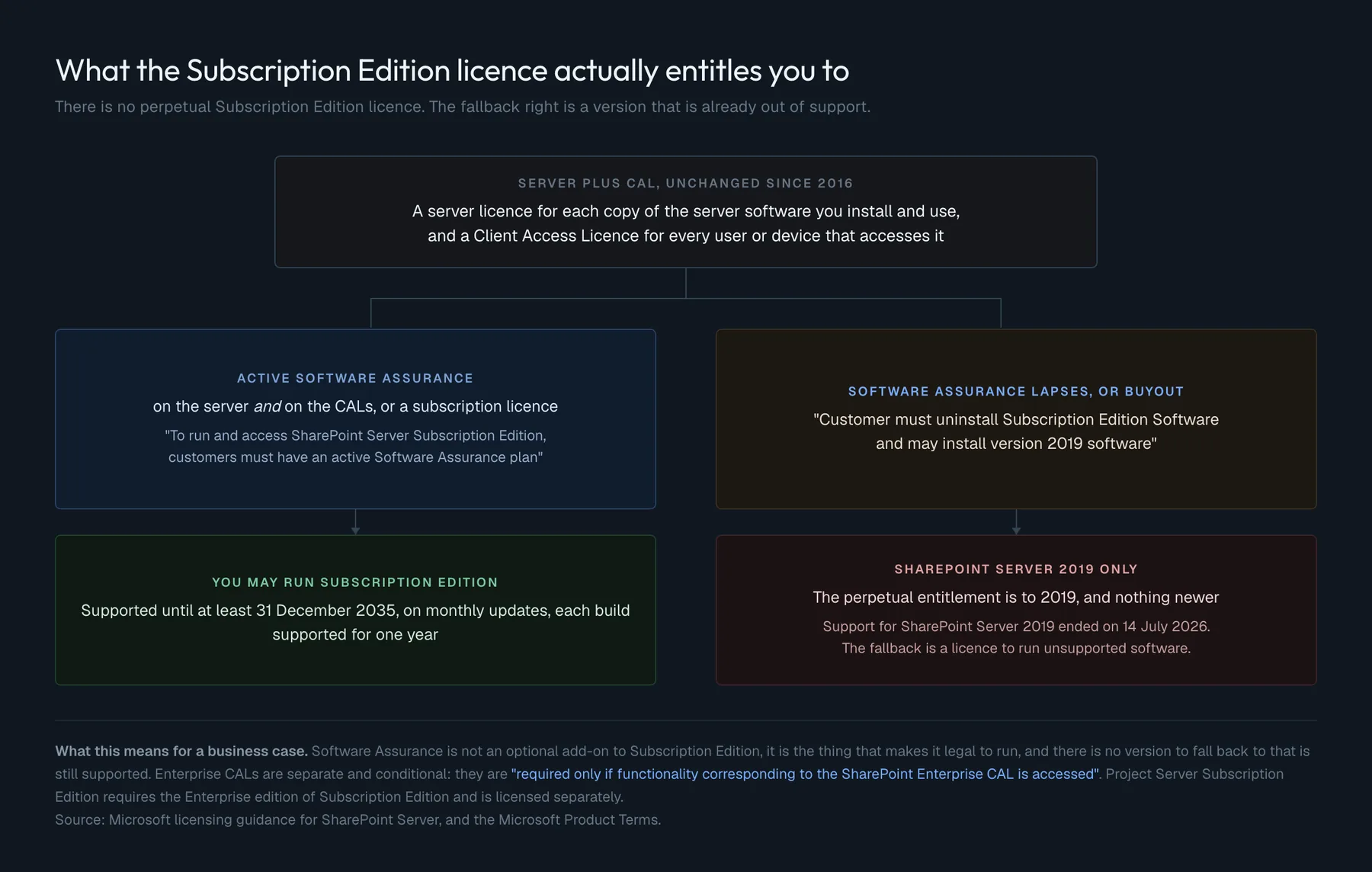
The model is still Server plus CAL. A server licence for each copy of the server software you install and use, and a Client Access Licence for each user or device that accesses it. That has not changed since 2016.
What changed is that you cannot buy Subscription Edition outright. Microsoft's licensing guidance is direct: to run and access Subscription Edition, customers must have an active Software Assurance plan, on the server and on the CALs, or a subscription licence. There is no perpetual Subscription Edition licence.
And the fallback is not what people assume. Subscription licences grant a perpetual entitlement to run SharePoint Server 2019 software only. In Microsoft's own words, if Software Assurance coverage lapses, or if you buy out, you "must uninstall Subscription Edition Software and may install version 2019 software".
Read that against the first table. The safety net under Subscription Edition is a version whose support ended on 14 July 2026. From that date, letting Software Assurance lapse does not drop you to an older but supported product. It drops you to a licensed, unsupported one. Whatever else is true about Subscription Edition, its licence is a recurring cost with no perpetual floor underneath it any more, and that belongs in the business case rather than in a footnote.
Three more licensing facts worth having straight:
- Enterprise CALs are additive and conditional. The guidance says Enterprise CALs "are required only if functionality corresponding to the SharePoint Enterprise CAL is accessed". You buy them for what people use, not for everyone.
- Project Server Subscription Edition only runs on the Enterprise version of Subscription Edition, and is licensed separately. It cannot be enabled on a Standard licence. It is no longer a separate install: it is a service application inside the SharePoint farm.
- Software Assurance brings Disaster Recovery rights for all editions, and License Mobility for server licences.
What changed from 2016 to 2019
This is the smaller of the two jumps, and it is mostly about the modern experience arriving on-premises.
- Communication sites, with the Hero web part
- Modern team sites, modern site pages and modern web parts
- Modern lists and libraries, brought level with what was in Microsoft 365 at the time
- Modern sharing, with warnings when you share with a large group or share many items at once
- Modern search, alongside the classic experience, with results appearing before you finish typing
- The SharePoint home page, which replaced
sites.aspxand became the entry point for self-service site creation - Fast site creation, in seconds, for three templates only: the OneDrive personal site, the modern team site and the communication site
- Files up to 15 GB, up from 10 GB
- File paths up to 400 characters, up from 260
#and%allowed in file and folder names- The OneDrive sync app (
OneDrive.exe) replacing Groove, with Files On-Demand - SMTP authentication when sending mail, so no more smart host relay just to satisfy a hardened mail server
- Power Apps, Power BI and Power Automate, through a gateway
- IIS 7+ APIs, dropping the IIS6 compatibility components from the prerequisites
The theme is consistent: 2019 is 2016 with the modern user interface and a set of limits raised. It is not a new architecture.
What changed from 2019 to Subscription Edition
This one is an architecture change, and it is almost entirely about identity, security and how the product is serviced.
Authentication. OpenID Connect 1.0 arrives, working with Microsoft Entra ID, AD FS 2016 or higher, and any third-party provider implementing OIDC. That is what makes multifactor authentication and conditional access reachable from an on-premises farm. The People Picker was reworked so that a trusted identity provider no longer requires a custom claims provider written in C#, provided the User Profile Application is synchronising from the provider's membership store.
Security. The farm gained its own SSL certificate management: generating signing requests, importing and exporting, deploying to every server, assigning to web applications, and warning before expiry, all through Central Administration and PowerShell. TLS 1.3 is supported, and strong TLS encryption is on by default, both only when the farm runs on Windows Server 2022 or later. The machineKey section of web.config is encrypted by default.
Deployment. Windows Server 2022 and Windows Server Core are supported. Upgrade is supported directly from both 2019 and 2016, N-1 and N-2, by database attach. Anything older than 2016 has to go through 2016 or 2019 first. AppFabric stopped being a separate component and became part of Distributed Cache.
Farm administration. Central Administration can use a host header, so it can share port 443 with content. Server Name Indication works. Web application IIS bindings can be changed without deleting and recreating the web application, which used to be a genuinely risky operation.
Sites and libraries. The modern list and library web parts became writable. In 2019 they were read-only, so people had to leave the page to add or edit anything; in Subscription Edition they create, upload, share, rename, delete and edit in place. Document sets got a modern experience. Bulk check-in and check-out arrived, and bulk download, which zips the selection, within limits: 10 GB per file, 20 GB in total, 100 levels of folders, 10 000 files.
Storage. A new remote BLOB storage provider, Remote Share Provider, moves BLOBs off SQL Server onto SMB file storage, with Test-SPRemoteShareBlobStore to check consistency.
PowerShell. The cmdlets became a module instead of a snap-in, so they load in any PowerShell console without Add-PSSnapin. They still require Windows PowerShell: they are not compatible with PowerShell 7.
What Subscription Edition has accumulated since 2021
Subscription Edition in 2026 is not the product that shipped in 2021. Feature updates land twice a year, in two rings: Early release, where new experiences appear as soon as they are ready, and Standard release, the default, where they arrive after extra validation. Most features spend one update in Early and the next in Standard.
Here is what actually accumulated, with the update that introduced it:
- AMSI integration (22H2), scanning HTTP and HTTPS requests through any AMSI-capable antimalware product, enabled by default from 23H2, with a health analyzer rule that sends simulated requests hourly to prove it still works
- SPFx 1.5.1 support (23H1), then React 16 and Office UI Fabric React 7 (23H2)
- Single "uber" patches (23H1). Before March 2023 you needed two updates a month, the core and the language pack, and installing only one was a common cause of strange behaviour
- People Picker over LDAPS (23H2), so directory lookups are encrypted
- Custom branding in the Suite Bar (23H2)
- Custom search verticals in the modern search results (24H1), which previously only existed in the classic experience
- Automatic machine key rotation (25H1), on a timer job that runs the last Sunday of every month
- A new database connectivity layer,
Microsoft.Data.SqlClient, with TDS 8.0 and TLS 1.3 to SQL Server (25H1), and per-database encryption settings (25H2) - CKEditor 5 replacing the end-of-life CKEditor 4 in the Text and Events web parts (25H2)
- Excluding the "Everyone" claim from the People Picker (26H1), at web application scope, to stop accidental over-sharing
Two of them deserve their own section, because they are the ones that break the usual table.
What never came to on-premises, and the footnotes that table needs
The comparison that circulates looks like this:
| Feature | 2016 | 2019 | SE | Online |
|---|---|---|---|---|
| Microsoft 365 Copilot | no | no | no | yes |
| Microsoft Loop | no | no | no | yes |
| Viva Connections | no | no | no | yes |
| SharePoint Embedded | no | no | no | yes |
| Full Microsoft Search | partial | partial | partial | yes |
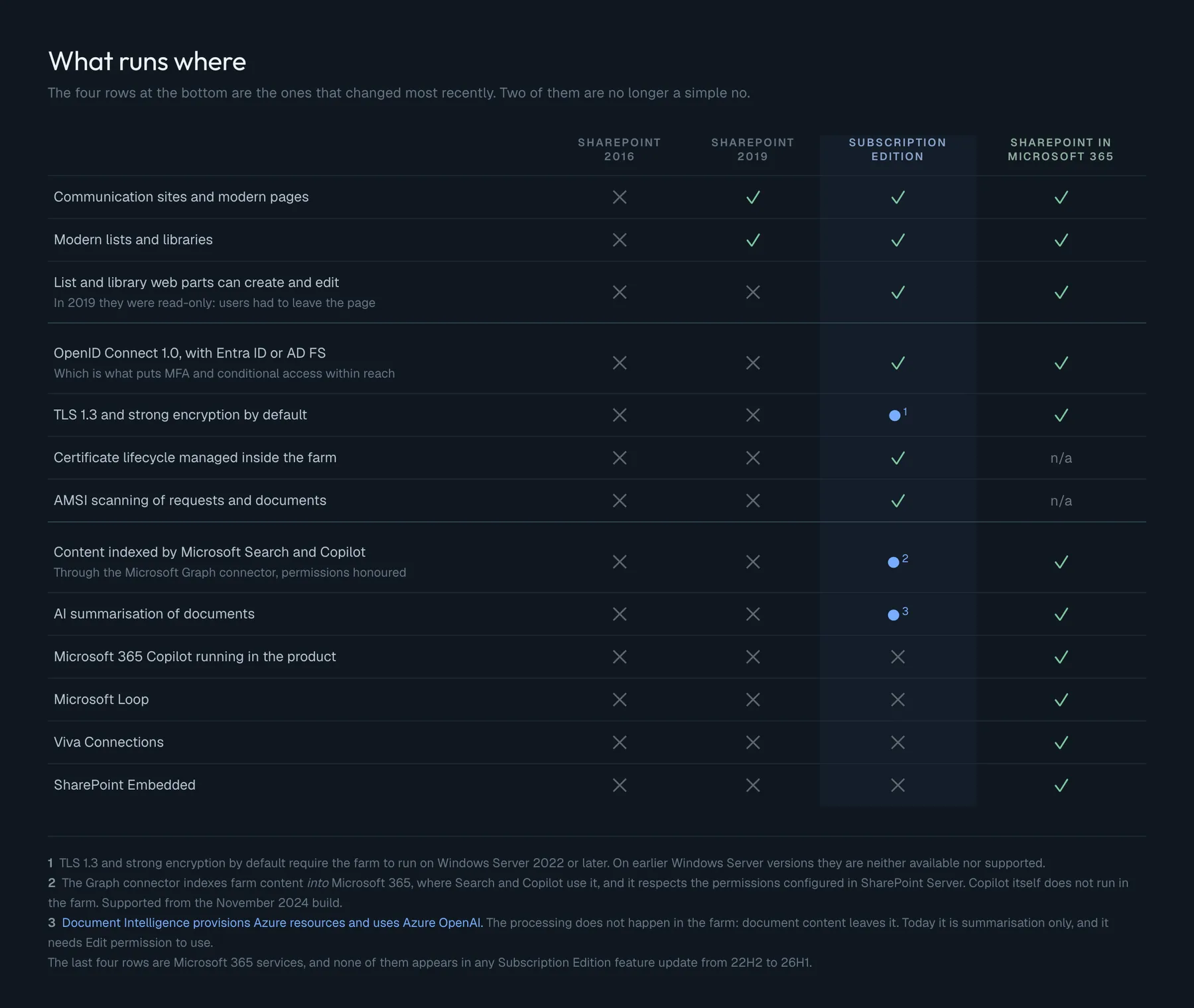
It is accurate as far as it goes. Two of those rows have changed shape since it was first written, and the change is recent enough that most copies of it predate the news.
Copilot cannot run in your farm. It can index it. From the November 2024 build, Subscription Edition supports the Microsoft Graph connector. Microsoft's description is precise: with Graph connectors, "Microsoft Search or Microsoft 365 Copilot in your organizations can index and leverage data stored in SharePoint Server", and the connector "respects the source permissions configured in SharePoint Server". So the answer to "can Copilot see our on-premises content" is yes, through a Microsoft 365 tenant, with permissions honoured. The answer to "does Copilot run on-premises" is still no. Those are different questions and they get different answers.
There is AI inside Subscription Edition, and it calls Azure. Document Intelligence arrived in 25H2, in Early release, and became generally available in 26H1. Today it is one thing only: Document AI Summarization, for .doc, .docx, .pdf, .txt, .rtf, .html, .pptx and .md.
The part that matters for anyone who chose on-premises for data residency is how it works. Enabling it means running a Microsoft PowerShell script that provisions Azure resources, and the summarisation itself "uses Azure OpenAI services". You supply a tenant ID, a subscription ID, a resource location, and a certificate from the SharePoint Certificate Manager, which the script uploads to an Azure app registration for Microsoft Entra ID authentication.
In other words the AI does not run in your farm. Your documents leave it. If the reason your SharePoint is on-premises is that content must not go anywhere, Document Intelligence is a feature you deliberately do not turn on, and it is off by default at farm, site collection and library level. One more detail worth knowing before anyone demonstrates it: users need Edit permission to use it. Read-only users cannot summarise anything.
# Farm-wide switch for AI summarisation. Requires farm administrator
# permissions, and does nothing unless the Document Intelligence feature
# has been activated on a site collection first.
Disable-SPDocSummary
Enable-SPDocSummary

# Which feature release ring is this farm on? Early gets new experiences
# sooner, and is where features like Document Intelligence appear first.
Get-SPFeatureReleasePreference
Set-SPFeatureReleasePreference -FeatureReleaseRing Standard
The rest of the table stands. Loop, Viva Connections and SharePoint Embedded are Microsoft 365 services and have not appeared in any Subscription Edition feature update from 22H2 to 26H1.
So the version with its footnotes has three qualified rows rather than a column of noes:
Deprecated and removed, and a date worth checking twice
Subscription Edition has its own list of things on the way out, and one date on it is the same as the 2016 and 2019 end of support:
Supported only until 14 July 2026: InfoPath Forms Services, SharePoint 2010 workflows, SharePoint Designer 2013, and Basic authentication.
So an upgrade off 2016 onto Subscription Edition carries InfoPath and Basic authentication across, and then loses them on exactly the day it was escaping. If your migration plan treats 14 July 2026 as the finish line, check that list first, because for some workloads it is the finish line twice.
Basic authentication is already tightening ahead of that date: from the 24H2 update, administrators can no longer create new web applications or extensions that use it. Existing ones keep working.
Also deprecated, without that date: Microsoft Workflow Manager, replaced by SharePoint Workflow Manager, which Microsoft says it will support beyond 2026. Internet Explorer 11 is supported only in Central Administration, not in any content site.
Already removed, and this list is the one that breaks upgrades: Access Services 2010 and 2013, classic authentication mode for content web applications, PerformancePoint Services, the Groove sync app and its list web service APIs, stsadm.exe, Update-SPHelp, the Claims to Windows Token Service, and legacy Cloud Hybrid Search.
Two of those are worth flagging for anyone running scripts they inherited. stsadm.exe is gone entirely, so any automation still calling it will fail rather than warn. And the Claims to Windows Token Service still appears in Central Administration, but the Windows service behind it is not installed, so starting it produces an error about a missing c2wtshost.exe.config. The feature looks present and is not.
The limits that shape architecture
There is a long tradition of comparing these products by their boundaries, and it produces tables nobody acts on. The useful version is shorter, because the limit is rarely what hurts.
A list can hold millions of items on any of these products. What hurts is a view that tries to read past the threshold, an index that was never created, and a column added after the list was already large.
Unique permissions are supported everywhere. What hurts is thousands of them in one library, because every one of them is a security scope that has to be evaluated, and because a year later nobody can say who can see what or why.
Metadata and folders both work. What hurts is choosing folders because they are familiar and then needing a cross-cutting view, or choosing metadata and never enforcing it, so half the documents have no values.
Search indexes everything, on-premises and online. What hurts is content types that were never designed, so there is nothing to refine by, and a crawl schedule set once and never revisited.
Sync works. What hurts is syncing a library that was designed as an archive.
None of those is a product difference. They are all design differences, and they follow you across every migration. Which is why the version of this comparison that starts from limits leads people to the wrong conclusion: they think a newer product will fix it. It will not.
Is it worth migrating? By scenario
Still on 2016 or 2019. The date is 14 July 2026 and both end on it. The direct upgrade path to Subscription Edition is supported from both, by database attach, so there is no intermediate hop. Do the deprecation check first: InfoPath, SharePoint 2010 workflows, SharePoint Designer 2013 and Basic authentication survive the move but not the date.
Cannot go to the cloud. Then Subscription Edition is the only supported on-premises SharePoint, and the question is not whether but on what terms. Budget Software Assurance as a permanent line item, plan to install updates more than once a year, and be honest that the perpetual fallback is now a licence for unsupported software.
A regulated environment. Subscription Edition gives you the modern authentication story, OIDC with Entra ID or AD FS, conditional access, TLS 1.3, AMSI, encrypted directory lookups, and certificate lifecycle management in the farm. That is a genuinely defensible position. Just decide about Document Intelligence deliberately, because the AI path leaves the building.
Full Trust Code solutions. These are the real reason farms stay. Nothing in Subscription Edition removes farm solutions, but every feature update is an opportunity for a solution built against old assumptions to break, and the servicing policy means you cannot sit on a build for three years while you decide. If you have Full Trust Code, the migration project is the code project.
Deep Teams and Microsoft 365 integration. Hybrid search, the Graph connector and Power Platform through a gateway close much of the gap, but not all of it. If the destination is a Microsoft 365 workplace and SharePoint is the last thing on-premises, the farm is a bridge, and it is worth naming how long the bridge is meant to stand.
Project Server in the farm. Your horizon is 31 December 2031, not 2035, and Project Server Subscription Edition requires the Enterprise edition of Subscription Edition and a separate licence. Plan for that four-year gap before it becomes an emergency.
What a migration does not fix
There is a natural way to read everything above: pick the product with the longest runway, and the problem is handled. It is the reading the tables invite, and it is one we have had to unlearn ourselves.
Products end support on a published date, and a published date can be planned for. Design decisions have no end of support. Folders chosen because they were familiar, unique permissions granted one at a time until nobody can reconstruct them, a customisation written where a configuration would have done: those travel. They arrive in Subscription Edition intact, and they arrive in Microsoft 365 intact.
So it is worth keeping two lists before committing to anything. What hurts today because of the version, and what hurts today because of a decision made when the requirement was urgent and the deadline was nearer than the consequence. A migration handles the first list. The second is the work either way, and it is usually the longer one.
Before you decide
- Write down the exact end of support date for what you run today, and note that 2016 and 2019 share it: 14 July 2026
- Check whether Project Server is in the farm, and if so plan to 2031 rather than 2035
- Confirm your Software Assurance status, and price it as permanent, because there is no perpetual Subscription Edition licence
- Understand that the fallback right is SharePoint Server 2019 only, and that its own support has ended
- Check the deprecation list against your workloads: InfoPath, SharePoint 2010 workflows, SharePoint Designer 2013, Basic authentication
- Search your automation for
stsadm.exebefore it fails silently in a scheduled task - Decide which feature release ring the farm should be on, and record the decision
- Plan to install updates more often than once a year, since each build is supported for one
- Decide about Document Intelligence explicitly, because it sends document content to Azure OpenAI
- If you want Copilot to see on-premises content, the mechanism is the Microsoft Graph connector, not an on-premises Copilot
- Fix the design problems now, because they are the ones that migrate with you